
GM Techline Connect + SPS2 1-Month Online Dealer Access
About GM Techline Connect + SPS2 1-Month Online Dealer Access
GM Techline Connect SPS2 – Official Dealer Programming, Coding & Diagnostic Subscription
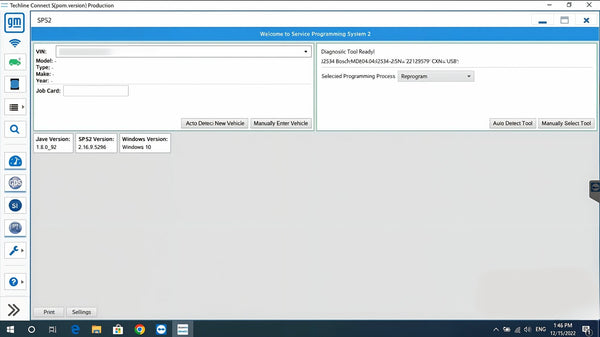
GM Techline Connect SPS2 is the official General Motors dealer programming platform for ECU programming, module flashing, coding, key programming, calibration updates, and vehicle configuration across the full GM range from 1996 through 2026+. Built around GM’s current Techline Connect environment, this subscription gives workshops direct access to the same factory programming ecosystem used in dealer operations. GM describes Techline Connect as the single application that integrates programming and scan tool diagnostics, while SPS is the ECU programming application that provides calibration updates and guided learn procedures.
For workshops that need more than basic diagnostics, this is the serious GM solution. It combines SPS2 for programming and module setup with GDS2 for modern diagnostics and Tech2Win for older platforms, creating a complete dealer-level environment for programming, coding, module replacement, key procedures, and post-repair configuration across legacy and current GM architectures. GM’s own materials position Techline Connect as the internet-based subscription service for vehicle calibrations, GDS software, and scan tool updates.
What is GM Techline Connect SPS2?
Techline Connect is GM’s integrated service software platform. Inside that environment, SPS2 (Service Programming System 2) is the programming application used to flash and update modules with official GM calibration files, perform guided programming routines, and configure replacement control units using VIN-based workflows. GM’s documentation describes SPS as the ECU programming application that provides calibration updates and guided learn procedures where required.
- Full ECU Programming: Program and update control modules with official GM calibrations
- Module Flashing: Perform software updates and reflash supported ECUs
- Module Setup & Initialization: Configure new or replacement modules after installation
- Vehicle Configuration & Coding: Carry out supported coding and configuration routines
- Key Programming: Support key and immobilizer-related procedures where applicable
- Guided Learn Procedures: Follow GM programming workflows built into SPS2
What is GDS2?
GDS2 is GM’s modern diagnostic application for newer vehicles. It is used for full system diagnostics, DTC analysis, live data, module communication, and system testing before and after programming work. GM and GM-related service materials consistently position GDS2 as the current scan tool software for newer architectures.
- Full System Diagnostics: Scan all modules and retrieve DTCs
- Live Data & Analysis: View and analyze real-time vehicle data
- Bi-Directional Functions: Perform supported active tests and system checks
- Modern Vehicle Support: Essential for later GM platforms and current architectures
What is Tech2Win?
Tech2Win is GM’s PC-based solution for legacy vehicle diagnostics. It remains important for older GM vehicles that sit outside the primary GDS2 coverage range, helping create true 1996–2026+ workflow coverage when paired with SPS2 and GDS2. GM support materials continue to reference GDS2 and Tech2/Tech2Win together across supported vehicle generations.
Core Capabilities
- ✅ Official GM Dealer Programming: Program, update, and configure modules using factory subscriptions
- ✅ Full ECU Coding & Configuration: Carry out supported coding, setup, and personalization procedures
- ✅ Key Programming & Security Procedures: Perform supported key and immobilizer functions
- ✅ Module Replacement Workflows: Initialize and configure replacement ECUs
- ✅ Calibration File Access: Use official GM calibration data through SPS2
- ✅ Complete Diagnostics Integration: GDS2 for modern vehicles and Tech2Win for older platforms
- ✅ Legacy to Current GM Coverage: Dealer-level workflows from 1996 through 2026+
Vehicle Coverage
This subscription is designed for broad GM coverage from 1996 through 2026+, including legacy, current, and newer EV-era vehicles. GM service information and support materials position SPS/SPS2, GDS2, and Tech2/Tech2Win as the core tools covering older and newer GM vehicles across multiple generations.
- Chevrolet: Silverado, Tahoe, Suburban, Traverse, Camaro, Corvette, Equinox and more
- GMC: Sierra, Yukon, Terrain, Canyon and more
- Cadillac: Escalade, CT4, CT5, XT4, XT5, LYRIQ and more
- Buick: Encore, Enclave, Envision and more
- Legacy GM Platforms: Supported through Tech2Win workflows
- Current & CAN-FD Vehicles: Supported with the correct interface and platform setup
Recommended Interfaces
- GM MDI 2 (Original) – GM states MDI 2 is the Global Diagnostic Interface tool for current and future GM vehicles and that it offers increased processing power and security
- DrewTech Mongoose-Plus GM3
- DrewTech CarDAQ-Plus 3
- VXDIAG VCX FD
- TopDon RLink X7
📌 Important: J2534 interfaces can work with GM programming and diagnostics, but they won't support CAN-FD vehicles or deliver full functionality on newer platforms. GM’s current vehicle coverage and interface guidance heavily favor newer-capability interfaces, especially MDI 2 for current and future vehicles.
Global Access & Regional Licensing
- USA & EU: Full functionality with unrestricted access
- Other Regions: Full functionality works on weekends (Saturday & Sunday)
Special Licensing Regions:
Russia, Belarus, Ukraine, China, and Iraq require $599 monthly subscription only because of additional licensing requirements.
System Requirements
- OS: Windows 10 / 11 Pro 64-bit
- Processor: Intel Core i5 or higher
- RAM: 8GB minimum
- Storage: SSD recommended
- Internet: Required for Techline Connect and programming access
What You Get
- ✔️ Official GM Techline Connect SPS2 dealer subscription
- ✔️ GDS2 and Tech2Win configured for full diagnostic coverage
- ✔️ Remote installation and complete setup
- ✔️ License is valid for 1 PC only
- ✔️ Expert technical support for setup-related issues
- ✔️ Installation completed within 24 hours guaranteed
Frequently Asked Questions
What is GM Techline Connect SPS2 used for?
It is used for GM dealer-level ECU programming, module flashing, configuration, coding, calibration updates, and guided learn procedures.
Does this include GDS2?
Yes. GDS2 is included as the modern GM diagnostic environment for newer vehicles.
Does it also cover older GM vehicles?
Yes. Tech2Win is included for older platforms, helping extend coverage across legacy GM vehicles.
Can I do full key programming with this setup?
Yes, supported key programming and immobilizer-related procedures are part of the dealer-level workflow where applicable.
Do I need a specific interface?
Yes. For best results, especially on newer and CAN-FD vehicles, use one of the recommended interfaces above. GM specifically positions MDI 2 for current and future GM vehicles.
Get Started
Get full GM dealer-level programming, coding, key programming, and diagnostics in one official subscription. Secure your GM Techline Connect SPS2 access today and bring complete factory programming capability into your workshop.